

Real Estate Reel Templates for Branded Property Marketing
Real estate reel templates give you a repeatable way to turn listing photos into branded property videos without writing a new script for every home. The useful ones do more than reserve space for a logo: they define the opening message, photo sequence, narration and next step for the viewer.
For independent agents and small agencies, that structure makes production easier while leaving room for each property’s strongest features. Below are five adaptable templates with scene plans and sample voiceovers, followed by a workflow for keeping the finished videos accurate and recognizable.
Build a template around a buyer question
Start with the question the reel should answer, not the transition effect you want to use. A new-listing video introduces a property. A feature reel explains one selling point. An open-house invitation gives someone enough information to plan a visit.
Keep the brand treatment consistent, but change the evidence and message for each listing.
| Template element | Keep consistent | Adapt for each property |
|---|---|---|
| Opening | Typography and text placement | Buyer question or main feature |
| Property sequence | Transition style and general pacing | Photos, order and feature emphasis |
| Narration | Tone and pronunciation standards | Verified listing facts |
| Captions | Font, contrast and visual hierarchy | Spoken script and property labels |
| Closing | Logo treatment and contact layout | Relevant call to action |
The most useful real estate reel templates separate these fixed design choices from editable listing information. That prevents an agent from accidentally carrying an old price, address or viewing date into the next video.
If several agents contribute content, your approach to consistent real estate team branding should also define who owns the approved logo, contact details and brand assets.
Treat the timing suggestions below as starting points. Adjust them to the number of usable photos and the amount of information a viewer needs, rather than stretching every listing to the same duration.
Five ready-to-adapt reel structures
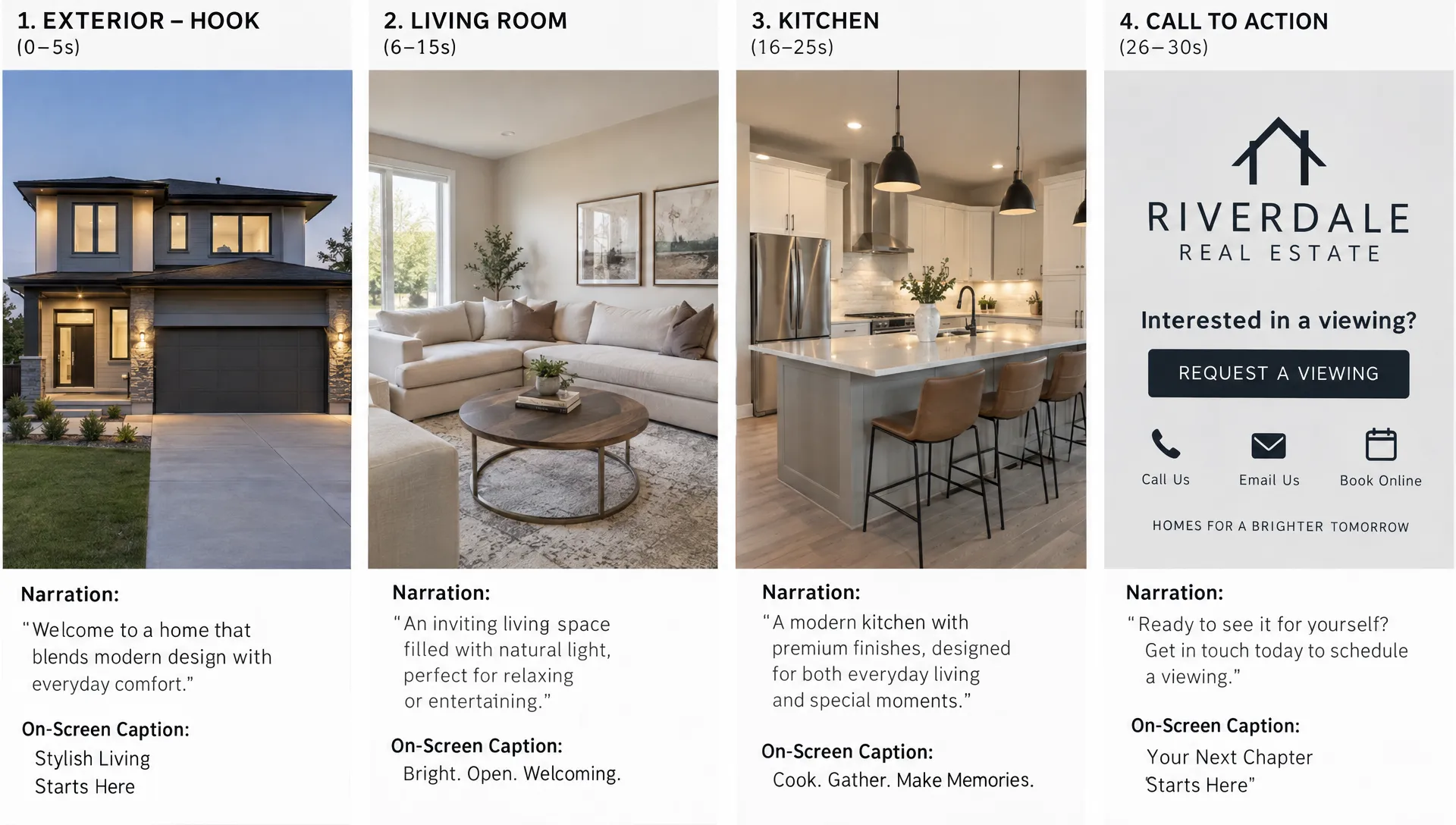
1. The new-listing introduction
Best for: Announcing a property and directing interested viewers to its full details. Aim for roughly 25-30 seconds, with one clear introduction rather than a compressed reading of the entire listing description.
Among real estate reel templates, this is the everyday starting point: identify the property, show its strongest spaces and offer a straightforward next step. Choose an opening photo that supports the headline, whether that is the exterior, living area or another defining feature.
Scene plan: Use the first 3 seconds for the strongest image and “[property type] in [area].” Spend approximately 3-18 seconds on three or four spaces in a logical order. Use 18-24 seconds for one verified differentiator, then finish with a branded contact card.
Voiceover to adapt: “Introducing [address or property name] in [area]. This [property type] offers [verified bedroom count] bedrooms, [main feature] and [second feature]. Take a closer look at the layout and finishes, then contact [agent name] for the full listing details.”
CTA: “Request the full listing.” Use a contact route you actually monitor. If the destination is your profile link, make sure the property is easy to find there.
2. The one-feature spotlight
Best for: Giving a listing a second or third promotional angle without repeating the launch video. A roughly 20-25-second reel can explain one feature more clearly than a longer tour that gives everything equal attention.
Feature-led real estate reel templates work when the images prove the opening claim. If the headline highlights a covered terrace, show the terrace and its connection to the home rather than opening with unrelated bedroom photos.
Scene plan: Open with “[feature] at [property name].” Follow with a wide view, a useful detail and a connecting space. Reserve the closing seconds for the property identifier and a contact prompt. If you only have one relevant photo, keep the reel shorter instead of filling it with unrelated rooms.
Voiceover to adapt: “Take a closer look at [verified feature] at [property name]. The photos show [visible detail] and [second visible detail], with access from [verified connecting space]. For the complete layout and property information, contact [agent name].”
CTA: “Ask for the floor plan” or “Request more details.” Choose the action that helps a viewer understand this specific feature.
3. The layout walkthrough
Best for: Properties where room relationships are more useful than a collection of decorative close-ups. This structure can also work when you have listing photos but no filmed walkthrough.
Layout-focused real estate reel templates should follow the property’s actual arrangement, not imply a continuous camera journey through disconnected images. Use a verified floor plan to establish the order, then match each photograph to its room.
Scene plan: Start with the property identifier and “A closer look at the layout.” Show the entrance or first relevant space, then the main living area, kitchen and bedrooms in an accurate sequence. Allow approximately 25-35 seconds if the layout needs explanation. Label rooms clearly and finish with an invitation to view the full floor plan.
Voiceover to adapt: “Here is a photo-based look at [property name]. From [verified starting point], the layout connects to [room or area]. The [next space] sits [verified relationship], while [bedroom or additional space] is located [verified position]. Request the floor plan to explore the arrangement in more detail.”
CTA: “Request the floor plan.” Avoid directional language if you cannot confirm the relationship between rooms.
4. The open-house invitation
Best for: Promoting a confirmed event with enough practical detail for someone to attend. A roughly 20-second reel can be sufficient when the date, time and attendance instructions are easy to read.
For event-based real estate reel templates, logistics matter more than showing every room. The property creates interest, but viewers should not have to search through the caption to find out when the event takes place.
Scene plan: Put “Open house” and the confirmed date in the opening frame. Follow with two or three representative property images. Close with the time window, address or permitted location detail, agent contact and any booking requirement. Keep the event card visible long enough to read it comfortably.
Voiceover to adapt: “Join us at [property name or address] on [date], from [start time] to [end time]. Explore [verified feature] and [second feature], and speak with [agent name] about the property. [Booking instruction or confirmed attendance arrangement].”
CTA: “Reserve your viewing slot” only when a reservation process exists. If attendance does not require booking, use the approved event instruction instead and remove or update the reel after the event.
5. The price-update announcement
Best for: Bringing renewed attention to an active listing after an authorized price change. Keep the message factual, with the updated price and property identity clearly connected.
Price-update real estate reel templates need a restrained approach. A revised asking price is useful information, but it does not automatically justify claims such as “best value,” “guaranteed investment” or “priced below market.”
Scene plan: Open with “[property name], updated asking price: [price].” Follow with the strongest property image and two verified highlights. Close with the same current price and a viewing prompt. Around 20-25 seconds is a practical starting point; there is no need to manufacture a dramatic reveal.
Voiceover to adapt: “[Property name] is now offered at [current asking price]. The property includes [verified feature] and [second feature]. Contact [agent name] for the current listing details or to arrange a viewing.”
CTA: “Arrange a viewing.” Before publishing, check the price, currency and listing status against the approved source. If you mention a previous price or calculate a reduction, verify both figures and any applicable advertising requirements.
Turn the structure into a branded production brief
Fill in facts before choosing effects
Create a short brief containing the selected template, approved listing details, chosen photos, voiceover and CTA. Replace every bracketed placeholder before generating or editing the video.
Match each spoken claim to a supporting image or reliable listing source. If the narration mentions an outdoor space, the associated scene should show it. If a feature is not visible, avoid using an unrelated image that could create the wrong impression.
This is where real estate reel templates save useful work: the structure stays in place while the property-specific evidence changes. You still need editorial judgment, particularly when photos are incomplete or a listing description contains ambiguous language.
Make the branding readable on a phone
Use a small set of approved fonts, colors and logo placements. Keep essential text separate from decorative elements, and avoid putting a large logo over the feature you want buyers to notice.
A vertical 9:16 layout is a useful starting point for full-screen social reels, but preview the actual destination before publishing. Interface buttons and crops can obscure text near the edges. The same source material may need a different layout for another channel, which makes formatting property videos without reshooting a useful part of the workflow.
Check the reel both with sound and muted. Captions and on-screen information should communicate the core message without forcing viewers to listen, while narration should add context rather than compete with dense text.
Review real estate reel templates before publishing
Review the exported video, not just the script. Generation and editing can introduce errors in pronunciation, captions, image order or the final contact card.
Use one compact approval checklist:
- Confirm the address, price, room counts, listing status and event details against approved information.
- Match images to their room labels and remove visuals that imply unsupported features.
- Check captions, agent contact details and the CTA destination.
- Confirm permission to use photos, music, voices and likenesses.
- Identify virtual staging or material visual alterations and apply the disclosures required for the listing channel and local rules.
An AI-generated camera move or staged interior should not misrepresent the property’s actual condition. Keep the original photos available for comparison and have a person approve the final reel.
For agencies developing a custom publishing integration, continuous correctness audits with Proof can help check software against approved requirements, such as retaining required disclosure fields. That is a safeguard for the publishing software, not verification that a property’s features or price are correct.
Measure the template against its intended job
Judge each video by the action it was designed to support. A launch reel might generate requests for listing details; an open-house reel might generate bookings; a layout video might prompt floor-plan requests.
Compare real estate reel templates across several comparable listings rather than declaring a winner after one post. Differences in price, location, property appeal and distribution can affect the outcome independently of the template.
Track viewing retention alongside meaningful inquiries where those metrics are available. Saves and shares provide useful context, but a high view count alone does not tell you whether the reel reached relevant buyers.
When revising a template, change one major element at a time, such as the opening message or CTA. Keep notes on what changed so the comparison remains useful.
Frequently asked questions
How long should a property reel be? Use the shortest duration that communicates the property’s message clearly. The 20-35-second plans above are production starting points, not platform rules or guarantees of performance.
Can I make these reels from listing photos? Yes. Choose images that support the script, arrange them logically and use motion without implying that photo-based content is a filmed walkthrough. Verify any spatial relationships described in the narration.
Can I reuse the same design for every listing? You can reuse the brand system and scene structure. Effective real estate reel templates still need a fresh opening, relevant images, verified facts and a CTA suited to the property’s current marketing stage.
Should every reel include an agent or avatar? No. Use a presenter when an introduction or explanation adds value. A property-led sequence may be clearer for a short feature spotlight or price update.
Create your next property reel with Diane
Choose one structure, gather the approved listing information and use it as your production brief. Diane turns listings, photos and details into narrated property videos, with options for your voice, your face or an AI avatar, plus custom real estate branding and social media formats.
Keep the template’s purpose clear, review the finished video and publish with one relevant next step. That gives you a repeatable process without making every property look or sound the same.