
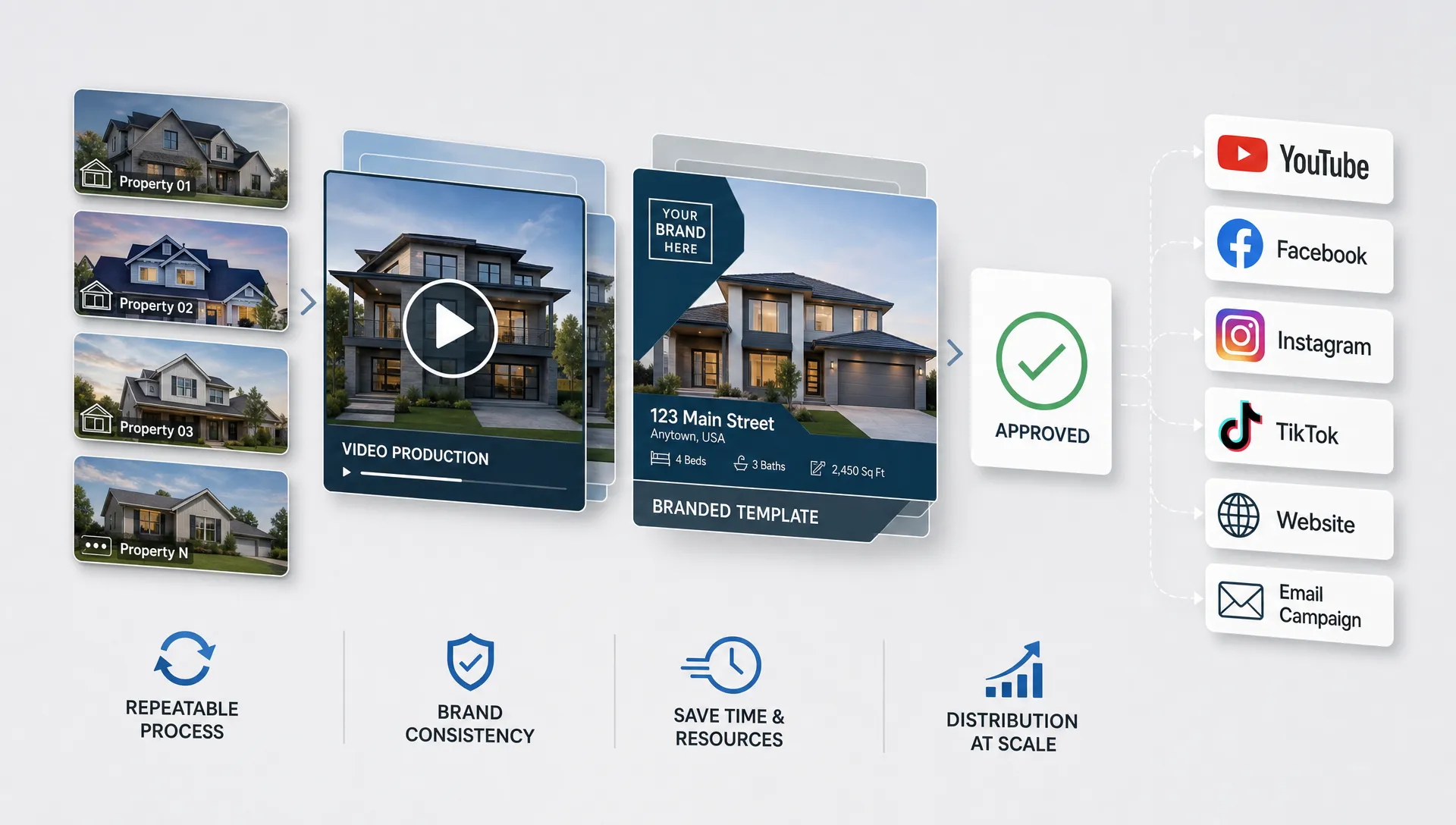
How a Realty Brokerage Can Roll Out Video at Scale
Video is no longer a luxury add-on for a realty brokerage. Buyers expect to preview homes in motion before they book a showing, sellers expect polished marketing and agents need content they can publish quickly across listing pages, Instagram, Facebook, TikTok, YouTube Shorts, email and follow-up messages.
The difficulty is not proving that video helps. Most brokerage leaders already know it does. The harder question is operational: how do you make video happen for every suitable listing without slowing agents down, losing brand consistency or creating a new production bottleneck?
The answer is to treat video as a brokerage system, not an agent side project. A scalable rollout needs clear standards, a repeatable intake process, templates, AI-assisted production, light approval controls and practical training. When those pieces are in place, video becomes part of the listing launch workflow instead of a special request that only happens for premium homes.
Start by defining what video at scale means
Scaling video does not always mean producing the same type of video for every property. A small condo, a luxury listing, a land parcel and a multi-unit investment property may need different formats. What matters is that your brokerage defines the baseline.
A practical baseline answers five questions:
- Which listings automatically receive a video?
- Which video formats are required at launch?
- Who supplies the listing details, photos and property highlights?
- Who reviews the video before publication?
- Where does the finished video get published?
Without those answers, each office or agent invents their own process. That creates uneven quality, missed deadlines and frustration. With a shared standard, agents know what to expect and the marketing team can plan capacity.
| Scaling decision | Practical brokerage standard | Why it matters |
|---|---|---|
| Listing coverage | Define whether all listings, selected listings or listing tiers get video | Prevents confusion and ad hoc requests |
| Video length | Set short social formats and longer listing formats when needed | Matches buyer attention by channel |
| Approval path | Name the agent, broker or marketing admin responsible for final checks | Reduces delays and compliance risk |
| Brand elements | Standardize logo use, colors, lower thirds and contact information | Keeps the brokerage recognizable |
| Publishing channels | Decide where every approved video is posted | Turns production into actual distribution |
For most brokerages, the best first move is a minimum viable standard: one short vertical listing video for social media and one horizontal or square version for listing promotion, created from the materials already gathered during listing intake.
Make video part of the listing lifecycle
The biggest mistake a brokerage can make is treating video as something that starts after a listing is live. By then, agents are already fielding calls, correcting listing copy, planning open houses and trying to keep the seller updated.
A stronger rollout connects video to the normal listing lifecycle.
During the pre-listing stage, the agent can identify the seller expectations, the likely buyer profile and the property features that deserve emphasis. During intake, the brokerage collects the essentials: listing description, photos, location details, room highlights, amenities, pricing context and agent contact information. On launch day, the first video should be ready to publish alongside the listing, not several days later.
This matters because the first 48 hours of a listing often carry the most marketing momentum. If the brokerage waits until later, video becomes reactive. If it is built into the launch process, it helps create the initial attention the listing needs.
A good brokerage workflow usually looks like this:
| Listing moment | Video opportunity | Typical output |
|---|---|---|
| Pre-listing appointment | Show seller the brokerage marketing plan | Sample listing reel or agent intro video |
| Listing intake | Collect assets and property details | Video brief ready for production |
| Launch day | Promote the live listing quickly | Social reel and listing video |
| First week | Retarget interested buyers and answer common questions | Feature clip, neighborhood clip or open house video |
| Price change or refresh | Renew attention without relaunching everything | Updated listing reel |
| Sold or under contract | Build seller proof and agent credibility | Success recap or testimonial-style video |
This lifecycle approach also gives agents a stronger listing presentation. They are not vaguely promising digital marketing. They can show sellers a repeatable video plan that the brokerage actually executes.
Centralize the brand system before production expands
At small scale, brand inconsistency can feel harmless. One agent uses a different intro, another uses a personal color palette, another adds music that does not fit the brokerage. At scale, those differences make the company look less professional.
Before rolling video out widely, create a simple video brand system. It does not need to be a 40 page creative manual. It should be specific enough that every agent, admin and editor knows what good looks like.
Include the essentials: logo placement, agent name format, brokerage disclaimer placement, preferred tone of narration, intro and outro rules, music guidelines, caption style, video aspect ratios and any local compliance requirements your leadership team wants reflected in the review process.
For larger teams, the most useful brand rules are the ones that remove decisions. Agents should not have to choose from 25 video styles every time. They need a small set of approved templates that fit common use cases: new listing, open house, price improvement, luxury showcase, neighborhood highlight and just sold.
If your brokerage has multiple offices or team brands, the same principle still applies. The brand system should allow local identity without letting every video look unrelated. For a deeper look at consistency across multiple agents or locations, Diane has a separate guide on how real estate networks can keep listing videos on brand.
Choose a production model agents will actually use
A scalable video rollout fails when the process asks agents to become editors. Most agents will not open a complex timeline editor, record multiple takes, resize files for different platforms and manually add captions every week. Even the agents who could do it often do not have time.
The production model should work from assets your brokerage already has: the listing, photos, property description and agent details. AI can then help turn that information into a narrated, edited video without starting from a blank canvas.
For example, Diane is built for real estate teams that need listing videos fast. It can create AI real estate videos from listing materials, support AI avatar presentation, use voice cloning narration, generate multilingual videos, apply cinematic editing, support social media formats, include custom real estate branding and help with direct social publishing. Those features matter because scale depends on fewer handoffs, not more software for agents to manage.
The right production model should also allow human oversight. Agents need to correct property details, adjust tone, approve visuals and make sure the video reflects the listing accurately. AI should reduce production time, not remove professional judgment.
When comparing options, evaluate the workflow instead of only the demo video. Ask how the platform imports listing data, how easy it is to edit a script, whether it supports your brand rules and how quickly an agent can publish. Diane covers this evaluation angle in more detail in its guide on how to choose a real estate platform for listing video.

Roll out in phases instead of forcing a big launch
A brokerage-wide video program should not begin with every agent, every listing and every channel on day one. That creates too many variables and makes it hard to know what is working.
Start with a controlled pilot. Choose a small group of agents who represent the actual range of your brokerage: high-volume agents, newer agents, listing specialists and at least one person who is not naturally enthusiastic about new tools. If the process works only for the most tech-friendly agent in the office, it is not ready for scale.
A simple 90 day rollout gives leadership enough time to test the workflow, fix friction and build internal proof.
| Phase | Main goal | Brokerage output | Success signal |
|---|---|---|---|
| Days 1 to 30 | Prove the workflow | Produce videos for a controlled set of listings | Agents can request, review and publish without heavy support |
| Days 31 to 60 | Standardize the process | Finalize templates, approvals and channel rules | Fewer revisions and faster launch timing |
| Days 61 to 90 | Expand adoption | Add more agents or offices | Video coverage increases without quality dropping |
During the pilot, track friction as carefully as results. Where do agents hesitate? Which fields are missing from listing intake? Which captions or claims require review? Which video format gets used most often? The answers will make the full rollout smoother.
Protect quality, accuracy and compliance
Real estate video has higher stakes than ordinary social content. A small mistake can create seller frustration, buyer confusion or regulatory risk. Scaling video therefore requires quality control.
Start with factual accuracy. Property features, bedroom count, square footage, lot size, school references, HOA details and pricing language should match approved listing information. If a detail is uncertain or sourced from a third party, the video should not present it as a verified claim unless your brokerage has confirmed it.
Next, review language for fair housing concerns. Video scripts, captions and avatar narration should avoid implying that a property is suitable or unsuitable for a protected class. Brokerages should work with their own broker, counsel or compliance lead to define review rules for their market.
Finally, set realistic expectations around AI-generated elements. If you use virtual home staging, AI avatars or voice cloning, the brokerage should have clear internal rules about consent, disclosure where required and seller approval. AI can make production faster, but accountability still belongs to the professionals publishing the content.
A good review process is light but consistent. It should catch errors without turning every listing video into a committee project. For many brokerages, the best approach is a checklist that the listing agent completes before publication, with broker or marketing admin review for higher-risk listings.
Train agents on outcomes, not software features
Agents adopt video faster when they understand how it helps them win listings, create buyer conversations and keep sellers informed. A training session that focuses only on buttons and settings will not change behavior.
Frame the rollout around practical use cases. Show agents how to include a sample video in a listing presentation. Give them examples of messages they can send with a new listing reel. Demonstrate how a short video can revive attention after a price adjustment. Walk through how to turn a just sold video into proof for the next seller conversation.
Office managers and marketing coordinators also need training. They are often the people who keep the system moving when agents are busy. If your leadership team is building broader AI marketing literacy, an AI marketing resource hub can be useful for exploring prompts, automation ideas and practical marketing workflows beyond listing video.
The goal is not to make every agent a content strategist. It is to give agents a small set of repeatable actions they can use every week.
Build distribution into the process
A video sitting in a download folder does not help the listing. Distribution needs to be assigned as clearly as production.
For each video format, decide who posts it and where it goes. The brokerage might publish to the company social channels, while the agent posts to personal profiles and sends the video directly to prospects. The admin team may add it to email campaigns or listing pages. The agent may use it in seller updates to show that marketing activity is happening.
Listing sites and social platforms do different jobs. Listing pages capture active search demand, while social video creates discovery and gives agents a reason to re-engage their audience. The best brokerage workflow uses both. Diane has a helpful breakdown on how agents can use video alongside real estate listing sites instead of treating one channel as a replacement for the other.
Distribution should also include follow-up. If a buyer asks about a property, the agent can send the listing video before suggesting a showing. If a seller wants an update, the agent can share where the video was posted and how it is being used. That turns video from a marketing asset into a communication tool.
Measure adoption before judging performance
Brokerage leaders often want to know whether video is generating leads. That is fair, but lead attribution can be messy across portals, social media, agent networks and direct messages. In the early rollout, adoption and operational metrics matter just as much.
Track whether the system is becoming part of the listing workflow. If agents are not requesting videos, if approvals take too long or if videos are not getting published, performance numbers will not tell the full story.
Useful metrics include:
- Percentage of eligible listings with a video
- Time from listing intake to finished video
- Time from listing launch to first video post
- Number of revision rounds per video
- Agent adoption by office or team
- Number of channels where each video is published
- Seller presentation use and seller update use
Once adoption is stable, look at marketing impact. Compare engagement by channel, buyer inquiries where video was used, showing requests after video distribution and seller feedback. For recruiting and retention, pay attention to whether agents mention video support as a reason the brokerage helps them compete.
The point is not to create a complex analytics dashboard on day one. The point is to know whether video has become a reliable brokerage capability.
Common rollout mistakes to avoid
The most common mistake is overproducing. If every listing video requires a custom concept, manual editing and long approvals, the program will stall. Save high-touch production for exceptional listings and use standardized AI-assisted workflows for the everyday volume that keeps the brokerage visible.
Another mistake is leaving agents alone after launch. A tool announcement is not adoption. Agents need reminders, examples, office champions and proof that other agents are getting value from the process.
Brokerages also struggle when they fail to update listing intake. If the production team lacks property highlights, approved wording or accurate photo order, video creation slows down. A better intake form can remove half the friction.
Finally, do not measure success only by viral views. Real estate video should support listing exposure, appointment setting, seller confidence and agent productivity. A video that helps an agent win a listing presentation or answer a buyer question has value even if it never becomes viral content.
Frequently Asked Questions
How can a small realty brokerage scale video without hiring a videographer? Start with AI-assisted listing videos created from existing listing materials, photos and property details. Use a small set of templates, assign one person to manage approvals and build video requests into listing intake.
Should every property listing get a video? Not always. Many brokerages start with a baseline for residential listings above a certain readiness standard, then add more formats for premium properties, open houses, price changes or seller presentations.
How do brokerages keep listing videos compliant? Use approved listing data, avoid unverified claims, review fair housing language and create a checklist for agents before publishing. Higher-risk listings should receive broker or marketing admin review.
Can agents use their own voice or face in scalable videos? Yes, if the platform supports it and the brokerage has clear consent and brand rules. Diane supports voice cloning narration and AI avatar presentation, which can help agents maintain a personal presence without recording every video manually.
What is the best first metric to track? Track the percentage of eligible listings that receive a video on time. If coverage and timing improve, the brokerage can then evaluate engagement, inquiries, appointment influence and seller feedback with better context.
Turn listing video into a brokerage capability
A realty brokerage that rolls out video at scale does more than make prettier listing content. It gives agents a repeatable marketing advantage, gives sellers more confidence in the launch plan and gives the brand a consistent presence across channels.
The key is to keep the system simple: define the standard, connect video to listing intake, protect brand consistency, train agents on use cases and measure adoption. Once the workflow is reliable, video can move from occasional marketing extra to everyday brokerage infrastructure.
Diane helps real estate agents and agencies turn listings, photos and property details into ready-to-publish videos with AI narration, avatars, multilingual support, virtual staging, custom branding and social formats. If your brokerage is ready to make video part of every listing workflow, Diane is built for that scale.